DEFINITION
exit condition (noun)
A rule in marketing automation that removes someone from a sequence the moment something changes, such as buying, booking a class, replying, or opting out.
For fitness and wellness studios, an exit condition is what stops a “Last chance!” Black Friday text from reaching someone who already bought, and moves them to the right next step instead.
The Black Friday Text An Exit Condition Prevents
It’s Cyber Monday. Sam bought your Black Friday class pack on Friday morning. She’s excited, she’s already booked her first class, and then her phone buzzes: “Last chance! Only hours left on our Black Friday deal.”
WITHOUT AN EXIT CONDITION
MONDAY · 9:00 AM
Last chance! Only hours left on our Black Friday deal.
Sam already bought. Now she wonders if you know who your customers are.
WITH AN EXIT CONDITION
MONDAY · 9:00 AM
Thanks for grabbing the pack, Sam! Want to book your first class?
Sam left the sale sequence the moment she bought, and got a welcome instead.
Nothing about that first message is technically wrong. It went out on schedule, to the list it was supposed to go to. The problem is that nobody told your marketing that Sam already bought. To her, it looks like your studio doesn’t know who its own customers are.
That’s exactly what an exit condition prevents.
STEP BY STEP
How An Exit Condition Works
Most marketing automations follow a simple path. Someone enters a sequence, like clicking your Black Friday offer, and then receives a series of messages over the next few days. An exit condition adds one important step in between every message: a check.
| 1 | Someone enters the sequence. For example, they click your Black Friday offer but don’t buy. |
| 2 | They get the first follow-up. A reminder by email or text a few hours later. |
| 3 | The automation checks before the next message. Have they bought? Booked a class? Replied? Opted out? |
| 4 | If something changed, they exit. They stop getting sale messages and move to the right next step, like a welcome sequence or a conversation with your team. |
| 5 | If nothing changed, the sequence continues. The next reminder goes out on schedule. |
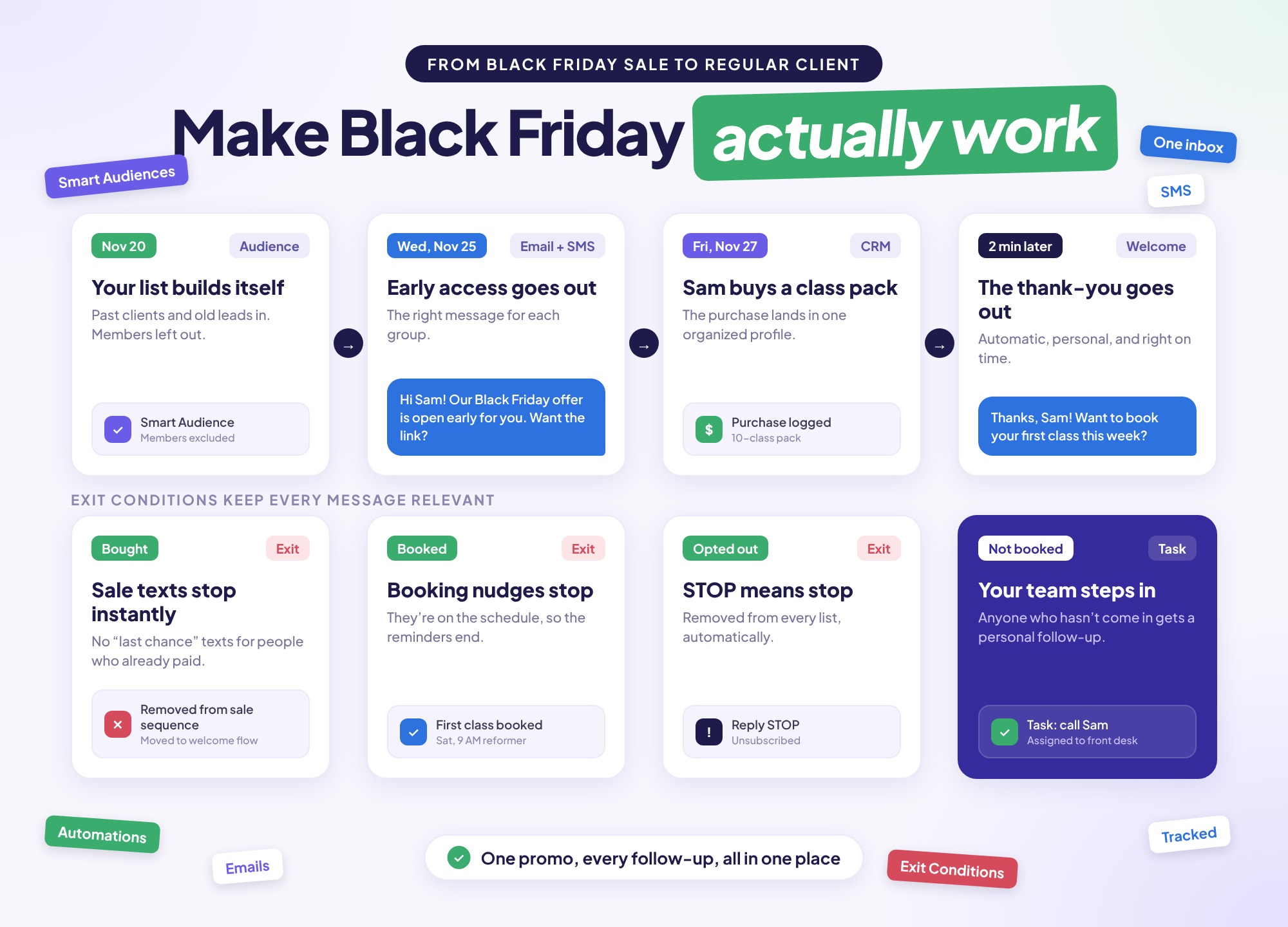
Without that check, the sequence keeps running no matter what the person does. With an exit condition in place, every message is based on where that person actually is. (Wondering how many follow-ups to send in the first place? See How Many Times Should You Follow Up With a Gym Lead?)
THE BIG FIVE
What Should Trigger An Exit Condition At A Fitness Studio?
Most fitness and wellness studios only need five exit conditions to cover almost every situation:
They bought
A purchase or payment takes them out of the sale sequence and into a welcome sequence.
They booked a class
Once they’re on the schedule, booking reminders stop.
They replied
The automation pauses so a real person on your team can take over the conversation.
They opted out
Anyone who replies STOP or unsubscribes is removed right away.
They’re already a member
Current members never enter your new-client sale sequence, so they never see a discount meant for someone else.
WHY IT MATTERS
Why Does An Exit Condition Matter More On Black Friday?
An exit condition matters more on Black Friday because you’re sending more messages to more people over a shorter window, and people buy fast, often within hours of your first email. On a normal week, a studio might send a few follow-ups to a handful of leads, and someone can catch mistakes by hand. On Black Friday, that isn’t possible, and a sequence without an exit condition does the most damage.
Without them, the same Black Friday mistakes happen over and over. Buyers keep getting “Don’t miss out!” texts after they’ve paid. Members see a discount that’s better than what they pay every month. People who already asked to stop keep hearing from you, which is how you rack up spam complaints. And your team ends up spending the busiest weekend of the year manually removing people from lists instead of welcoming new clients.
The worst part is the timing. Those mistakes land right after someone trusts you with their money, the moment you most want to make a good impression.
THE CATCH
Why An Exit Condition Needs Connected Data
Here’s the catch: an exit condition can only stop a message if your automation knows what happened. If purchases live in your booking software, texts go out from a separate app, and emails come from a third tool, none of them know that Sam bought on Friday. So the messages keep going.
DISCONNECTED TOOLS
Booking softwareTexting appEmail toolNone of them know Sam bought, so the sale texts keep going.
ONE CONNECTED SYSTEM
Purchases + bookings + messagesThe moment Sam buys, the exit condition sees it and stops the sale messages.
That’s why so many studios struggle with this. It’s not that they don’t care about sending the right message. It’s that their tools can’t see each other. For exit conditions to work, your purchases, bookings, and messages need to live in one place, or at least be connected.
IN LENZVU
How Does An Exit Condition Work In LenzVU?
In LenzVU, the exit condition is built right into Workflow Automations. LenzVU is a CRM and marketing automation platform for fitness and wellness studios, and because your leads, messages, and client activity all live in one place, it can tell when something changes and react right away. (For the full Black Friday setup, see Your Black Friday Playbook.)
Buyers move straight into a welcome sequence.
A Stripe payment, a booking from your connected scheduling platform, or a purchase tag can take someone out of your sale sequence the moment they buy, and start a welcome sequence that helps them book their first class.
Replies go to a real person.
When a lead replies, the automation stops and LenzVU assigns a task to your front desk or studio manager, so the conversation feels personal.
Opt-outs are removed instantly.
Anyone who replies STOP or unsubscribes comes out of every sequence right away.
Members never see the wrong offer.
Smart Audiences keep current members out of your new-client Black Friday sequence from the start.
Connects with Mindbody, WellnessLiving, MarianaTek, TeamUp, fitDEGREE, Antaris, Acuity Scheduling, Spivi, and Stripe, so your purchase and booking data is there for your exit conditions to use.
Exit Condition Key Takeaways
| ✓ | An exit condition removes someone from an automated sequence when something changes, like a purchase, booking, reply, or opt-out. |
| ✓ | On Black Friday, an exit condition stops buyers from getting “Last chance!” messages after they’ve already paid. |
| ✓ | Most studios need five: purchased, booked, replied, opted out, and already a member. |
| ✓ | An exit condition only works when purchases, bookings, and messages are connected in one system. |
Frequently Asked Questions
What is an exit condition in marketing automation?
An exit condition is a rule that removes someone from an automated sequence when something changes, like buying, booking, replying, or opting out. It keeps people from getting messages that no longer apply to them.
What’s the difference between an exit condition and an unsubscribe?
An unsubscribe removes someone from all of your marketing. An exit condition removes them from one specific sequence, like your Black Friday sale reminders, and can move them into a different one, like a welcome sequence for new buyers.
What is an example of an exit condition?
A studio sends Black Friday reminders to everyone who clicked its offer. When one of those leads buys a class pack, the exit condition removes them from the reminders and starts a welcome sequence that helps them book their first class.
Is an exit condition the same as a trigger?
No. A trigger starts an automation, like clicking an offer or filling out a form. An exit condition ends it early when something changes, like a purchase or a reply.
Which exit conditions should a studio use for Black Friday?
At minimum, remove people when they buy, book a class, reply, or opt out, and keep current members out of your new-client sale sequence entirely.
Does LenzVU have exit conditions?
Yes. Exit conditions are built into LenzVU’s Workflow Automations, and they can use purchases, bookings, replies, opt-outs, and tags to move people out of a sequence automatically.
The Smallest Setting That Protects Your Biggest Weekend
An exit condition is easy to overlook, but on Black Friday it decides whether your follow-up feels thoughtful or careless. Set them up before the sale starts, and every buyer gets a welcome instead of a sales pitch, every member gets treated like a member, and your team never has to clean up lists by hand.
BLACK FRIDAY IS NOV 27
See how exit conditions work in LenzVU
Book a demo, and we’ll show you how to set up your Black Friday follow-up so every message reaches the right person.